Fox Terrier Dog Silhouette: An Embroidery Designer’s Honest Take
First Impressions: Clean Lines, Strong Breed Character
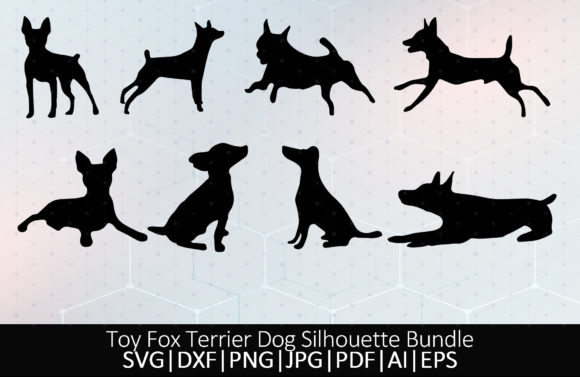
When I first opened the Fox Terrier Dog Silhouette bundle, I immediately noticed how well the designer captured the toy fox terrier’s alert posture. The ears stand upright, the tail points with energy, and the overall shape feels both elegant and spirited. This isn’t a generic dog outline—it’s a silhouette that breed lovers will recognize at a glance. For anyone working with machine embroidery, that kind of instant recognition is pure gold. Whether you’re stitching a personalized gift or a boutique product, a design that carries breed-specific personality makes the finished piece feel intentional and premium.
What I appreciate most is the simplicity. Clean, uninterrupted curves make the silhouette easy to scale, and the lack of intricate internal detail means it won’t turn into a blurry mess when you start digitizing for an embroidery file. The bundle includes multiple SVG poses, so you can choose the stance that best fits your embroidery project. As a Crafts and Graphics asset, this is a smart starting point for makers who want to move beyond basic clip art into something that looks hand-selected and personal.
Real Project Test: Stitching the Fox Terrier on a Canvas Tote
I decided to test the silhouette in a real-world scenario: a custom embroidered tote bag project for a client who breeds toy fox terriers. The goal was a minimalist, high-contrast design that would hold up after dozens of washes and still look crisp. Before even touching my machine, I spent time studying the SVG’s proportions. The delicate legs and fine muzzle are beautiful, but they also demand careful attention during digitizing because a stitch that’s too dense could distort the shape on soft fabric.
I opted for a canvas tote in natural cream, which gave me a stable, medium-weight surface. The silhouette was converted into a simple satin stitch outline—no fill, just a clean contour. This approach preserved the airy feel of the original graphic and kept the stitch count low, which is always a plus when you’re batch-producing handmade products. The result was a tote bag that looked like something from a high-end pet boutique, not a rushed craft fair item.
Choosing the Right Fabric and Stabilizer
For this kind of machine embroidery design, your fabric choice can make or break the final look. I recommend staying away from overly textured or stretchy fabrics unless you’re experienced with hooping and stabilization. A dense canvas, denim, or linen gives you a reliable foundation. For the tote, I used a medium-weight cut-away stabilizer, which prevented the outline from puckering even after the tote was loaded with books. If you’re working on a sweatshirt or a baby onesie, a fusible mesh stabilizer and a light touch on the stitch density will keep the design from pulling the fabric out of shape.
Where This Silhouette Shines in Embroidery
The Fox Terrier Dog Silhouette is incredibly versatile. Its graphic nature means it translates well to a wide range of embroidery projects without needing to be redrawn. Here are a few places I’ve seen it work beautifully—and where I’d confidently use it in my own shop:
- Embroidered patches: The defined outline creates a patch that’s easy to finish with a merrow edge or a satin stitch border. It’s a classic look for denim jackets or backpacks.
- Sweatshirt embroidery: A small chest placement feels understated and premium. Pair it with a thin, tonal thread for a subtle monogram-like effect.
- Kitchen towels and aprons: The silhouette adds a charming, homey touch. I’ve stitched a similar dog silhouette on a flour sack towel and it became an instant favorite hostess gift.
- Baby and toddler apparel: Scaled down to a 2-inch size, the design works on bibs, onesies, and tiny tees. Just be mindful of stitch density so the fabric stays soft against delicate skin.
- Pillow covers and blankets: Enlarged to fill a 5x7 hoop, the silhouette becomes a striking focal point for nursery decor or a cozy throw.
- Personalized gifts: Add a name in a simple running stitch font below the fox terrier shape, and you’ve got a gift that feels tailor-made for the recipient.
Because the design is essentially a single-color graphic, it also works beautifully on dark fabrics. The contrast is high, and the eye reads the shape instantly. I’ve tested it on a washed black cotton tee, and the result was crisp and modern, exactly the kind of look that appeals to buyers who want pet-themed apparel without the cartoonish feel.
Potential Pitfalls: What to Watch Before You Stitch
No design is perfect for every situation, and the Fox Terrier Dog Silhouette has a few characteristics that need a practical eye. The slender legs and pointed ears are lovely, but they become vulnerable when you scale the design down too far. If you’re working with a small hoop size—say, 4x4 inches—the legs might fall below 2mm in width, which can cause thread breaks or a messy stitch path. I always recommend doing a test stitch on scrap fabric and checking whether the smallest details hold up. If they don’t, scale the design up slightly or, if you’re digitizing, adjust the stitch width manually.
Curved surfaces like caps or hats also demand extra care. The silhouette’s long horizontal line from nose to tail can distort if it’s not positioned correctly on a cap’s curve. I’ve found that centering the design on a cap’s front panel and slightly tilting the fox terrier so it follows the arch of the brim gives a more natural look.
Another point: the design is delivered as an SVG bundle, not a ready-to-stitch embroidery file. That means you’ll need to digitize or convert the graphic before you can use it in your machine. This is a crucial step and one that can trip up beginners. Always check what’s inside the ZIP file. If the download doesn’t include embroidery formats like PES, DST, or EXP, you’ll need to bring the SVG into your digitizing software and map out the stitch types yourself.
From Screen to Stitch: Converting the SVG for Embroidery
I get a lot of questions from crafters about using SVG files for embroidery. The good news is that a clean silhouette like this one makes the digitizing process much smoother. You can take two main paths: create a satin stitch outline for a delicate, drawn look, or design a fill stitch version if you want a solid, bold silhouette. I’ve tried both, and each has its place. The satin stitch outline is my go-to for a refined, boutique finish, while the fill stitch version works well for patches and items that need a more graphic, screen-printed vibe.
If you’re comfortable with running stitch accents, you can even add a subtle collar or a tiny heart near the chest—the base SVG is simple enough to customize without overwhelming the original shape. Just remember that any added detail should be tested for stitch density. Too many stitches in a small area can create a stiff, bulletproof patch that feels uncomfortable on wearables.
Applique vs. Fill Stitch: Two Paths to Explore
One of my favorite ways to use this silhouette is as an applique design. You can cut the fox terrier shape from a contrasting fabric, fuse it to your base fabric, and then stitch a satin edge around it. This technique gives a rich, textured look and reduces the stitch count significantly. It’s perfect for a plush blanket or a child’s quilt. The SVG’s clean lines make it easy to create an accurate applique template, and the finished product feels substantial and heirloom-quality.
The Business Angle: Selling Finished Products with This Design
If you’re an Etsy seller or a small shop owner, the Fox Terrier Dog Silhouette is a smart addition to your design assets. Its breed-specific appeal means you can target a niche audience without competing against every generic dog design on the market. Toy fox terrier lovers are passionate, and they actively seek out products that celebrate their breed. A well-stitched silhouette on a tote bag, apron, or pillow cover can become a reliable seller, especially when you offer personalization options.
Before you list anything, though, pause and confirm the commercial embroidery license. The product description mentions the SVG can be used for printing, cutting, t-shirts, and mugs, but that doesn’t automatically grant you the right to sell finished embroidered items. Always check the included license terms inside the ZIP file. If the bundle is intended for personal use only, reach out to the designer for a commercial extension. This is a step I never skip—it protects your business and respects the original artist’s work.
Licensing and Commercial Use Check
Many SVG bundles are sold with a standard personal use license, and small shops can get caught off guard. I recommend reading the fine print before you invest time in digitizing and stitching. If you’re unsure, contact the seller directly. A clear commercial license gives you peace of mind when you’re listing finished products on your Etsy store or selling at craft fairs.
Tips for a Flawless Embroidery Project
After working with the Fox Terrier Dog Silhouette on multiple fabric types, a few practical truths emerged. These are the notes I’d tape to the wall above my machine:
- Test on a scrap first, especially if you’re digitizing from scratch. A quick sew-out reveals any density issues before you ruin good fabric.
- Check thread color contrast on your actual fabric. A dark thread on a black sweatshirt might look elegant, but if the fabric is charcoal, the silhouette can disappear under certain lighting.
- Review stitch density in your digitizing software. For smaller sizes, reduce the density to avoid thread breaks and stiff patches.
- Confirm your hoop size can accommodate the scaled design plus any added text. A 4x4 hoop is generous for a 3-inch silhouette, but once you add a name, things can get tight.
- Inspect small details like the toes and tail tip. If they look too thin on screen, they’ll be even thinner in thread. Adjust as needed.
- Test in black and white mockups before you commit to a color. A silhouette that looks great in a digital preview might need a slight outline tweak when printed on a textured fabric.
- Compare light and dark fabric backgrounds. A light gray thread on a dark fabric can create a sophisticated tone-on-tone effect, but you’ll need to be precise with your stabilizer to keep the outline crisp.
- Use proper stabilizer for your fabric type. Cut-away for knits, tear-away for woven, and always a topper for towels or fleece.
Final Thoughts: A Versatile Canine Silhouette for Makers
The Fox Terrier Dog Silhouette isn’t just a graphics file—it’s a launchpad for dozens of embroidery projects that feel personal, polished, and breed-authentic. While it requires a bit of digitizing know-how, the payoff is a design that can move easily from a printable mockup to a finished product that earns customer trust. I’ve used it on tote bags, kitchen linens, and a baby gift that made the recipient tear up, and each time the silhouette delivered that clean, professional look that handmade shops need.
For craft business owners who want to offer something beyond the usual, this bundle is a smart design asset to keep in your library. Just remember to test, adjust, and always confirm the license before you sell. In the right hands, this toy fox terrier silhouette can become a signature piece that buyers remember.